
Most enterprises have already deployed AI agents. Very few have priced for what those agents actually cost to run.
Agents do not behave like human users. They run continuously, call tools, retry on failure, and loop across reasoning steps until an objective is complete. The token economics are completely different from chatbots, and most enterprise AI budgets have not caught up.
The open-source community got a blunt preview of where this gap leads. In April 2026, Anthropic blocked Claude Pro and Max subscribers from powering third-party autonomous agent tools like OpenClaw. Developers running continuous agents faced cost increases of up to 50 times their previous monthly spend overnight. Anthropic's Boris Cherny was direct: "Our subscriptions weren't built for the usage patterns of these third-party tools."
Enterprises are building the same economics into their own AI stacks, and unlike Anthropic, most do not have the visibility or the governance layer to catch it before it compounds. That is exactly the problem DAXA built Pebblo to solve.
Why AI Agents Consume Far More Tokens Than Chatbots
Most enterprise AI budgets were modelled on chatbot usage. That model is broken.
A chatbot and an autonomous agent are fundamentally different cost units:
- Chatbot: One query, one response. Token consumption is bounded by the conversation. Predictable, easy to forecast.
- Autonomous agent: Breaks down tasks, calls tools, re-ingests outputs, retries on failure, and loops across multi-step reasoning until an objective is complete.
- Token gap: Where a chatbot uses thousands of tokens per session, a single agent handling a document workflow, a code review, or a data pipeline burns through millions in a single run.
The OpenClaw numbers made this concrete. Instances were running 24/7, and a single heavy user was consuming compute that would cost multiples of the subscription price at true API rates. Multiply that across thousands of instances, and the math breaks fast. Anthropic was effectively subsidising frontier model token consumption for always-on agent workloads at flat chatbot prices. It was never going to hold.
3 Patterns Quietly Draining Enterprise AI Budgets
Across enterprises running AI agents today, and the same three dynamics are playing out.
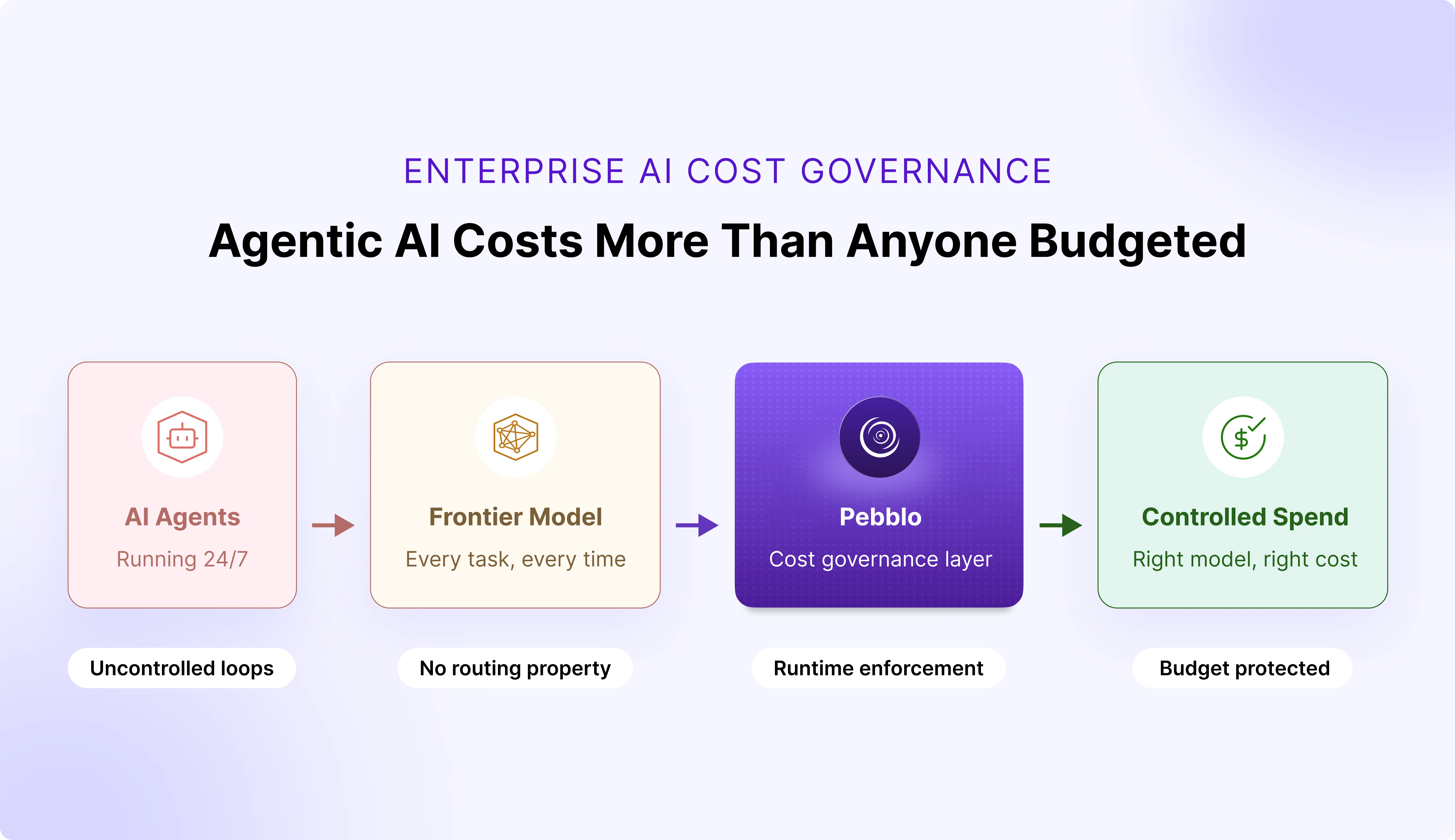
1. Agents run continuously, and no one is watching.
- Unlike humans, agents do not pause between prompts
- Every reasoning step, tool call, and retry generates tokens
- Costs accumulate invisibly between billing cycles
2. Every agent defaults to the most expensive model available.
- No policy enforces that a routine document summary should route to a lightweight model
- Developers build with the most capable model because that is what they test with
- Opus-class pricing applies to Haiku-class tasks, at scale, every day
3. There is no spend governance layer in the AI stack.
- Enterprises have cloud cost controls and SaaS procurement guardrails
- Almost none have per-agent or per-application AI cost quotas enforced in real time
- Spend accumulates silently until the invoice arrives
This is cloud sprawl, 2015 edition, except instead of forgotten EC2 instances, it is agentic loops nobody is governing.
Why Enterprises Have No Real-Time Visibility Into AI Agent Spend
Most enterprises cannot answer a basic question: what is their AI actually doing right now? Not in aggregate. Not on last month's invoice. Right now, across every agent loop, every model call, every retrieval pipeline running across every business unit.
The blind spots driving invisible cost:
- An agent fires 40 tool calls to complete a single task, no one flags it
- Multiple agents across teams run the same expensive retrieval pipeline against the same data source, no one consolidates it
- A workflow that could run on a lightweight model routes to a frontier model because no policy was set
What the OpenClaw episode revealed:
Anthropic had no way to distinguish a human using Claude conversationally from an agent running thousands of API calls a day under the same subscription. There was no spend layer, no routing policy, no quota enforcement. When the infrastructure buckled, the only lever available was to close access entirely, after already introducing five-hour session caps during peak periods. Unrestricted agentic usage does not just hurt the budget; it degrades availability for everyone on the same capacity.
Enterprises are building the same stack, without the infrastructure team or billing signal to catch it before it compounds.
How AI Cost Quotas and Model Routing Control Agent Spend
Agent cost control is not a finance problem. It is a governance problem and it needs to be solved where the cost actually originates: inside the AI runtime, before tokens are consumed.
Cost quotas: governance that runs in real time
AI cost governance needs to work the way cloud cost governance works: budget enforcement at the resource level, enforced in the runtime.
- Cost quotas per application, per team, per agent
- Policies that trigger real responses when limits are approached: route to a lighter model, queue non-critical tasks, alert the owner
- A circuit breaker that fires before the damage is done, not a line item on next month's invoice
Model routing: right model, right task, right cost
Not every task needs a frontier model. This is obvious in principle and almost universally ignored in practice.
- A routine lookup routes to a fast, lightweight model
- A complex multi-document reasoning task routes to a capable frontier model
- A task touching regulated data routes to a compliant model tier
- No developer reconfiguration. No manual overhead. Enforced by policy, at runtime, automatically.
The expensive model stays reserved for tasks that genuinely need it. Cost quotas and model routing together form the spend governance layer that belongs inside the AI stack under enterprise control, not left to model providers to enforce by cutting off access.
How DAXA Built AI Cost Control Into the Runtime With Pebblo
At DAXA, we asked a harder question: what if you governed AI costs at the point where they actually originate, before the model is selected, before the token meter starts running?
That architecture led us to build cost governance and model routing as foundational capabilities inside Pebblo.
1. Cost quota enforcement
- Per team, per application, per agent
- Real-time policy enforcement that responds intelligently when budgets are approached: routing to cheaper models, queuing low-priority tasks, alerting owners before limits are blown, not after
2. Policy-driven model routing
- Rules that incorporate task complexity, data classification, and cost thresholds into every model selection decision
- The right model for the right task, automatically, with no developer intervention required at runtime
3. Full AI spend visibility
- A complete data bill of materials for your AI stack
- Which agents called which models, how many tokens were consumed, which workflows are driving cost
- Audit-ready, not just retrospective
Together, these capabilities create something reactive billing alerts fundamentally cannot: cost governance that runs inside the AI stack, at every decision point, before costs are incurred.
The Path Forward
Agentic AI is far more expensive to run than chatbots. Right now, enterprises are paying without realising it, costs accumulating across ungoverned agent loops, over-provisioned model selections, and workloads that were never priced for the usage patterns they actually generate.
The OpenClaw episode was a preview. Anthropic drew its line at the subscription model. Enterprises will draw theirs at the budget. The question is whether they draw it proactively, with governance built into the runtime, or reactively, after the infrastructure or the invoice makes it unavoidable.
Build the cost governance layer inside your AI stack, under your control. Because the agents will keep running, the token meters will keep turning, and the enterprises that govern AI costs at the runtime level, not the invoice level, are the ones that will capture the ROI that agents promise.