
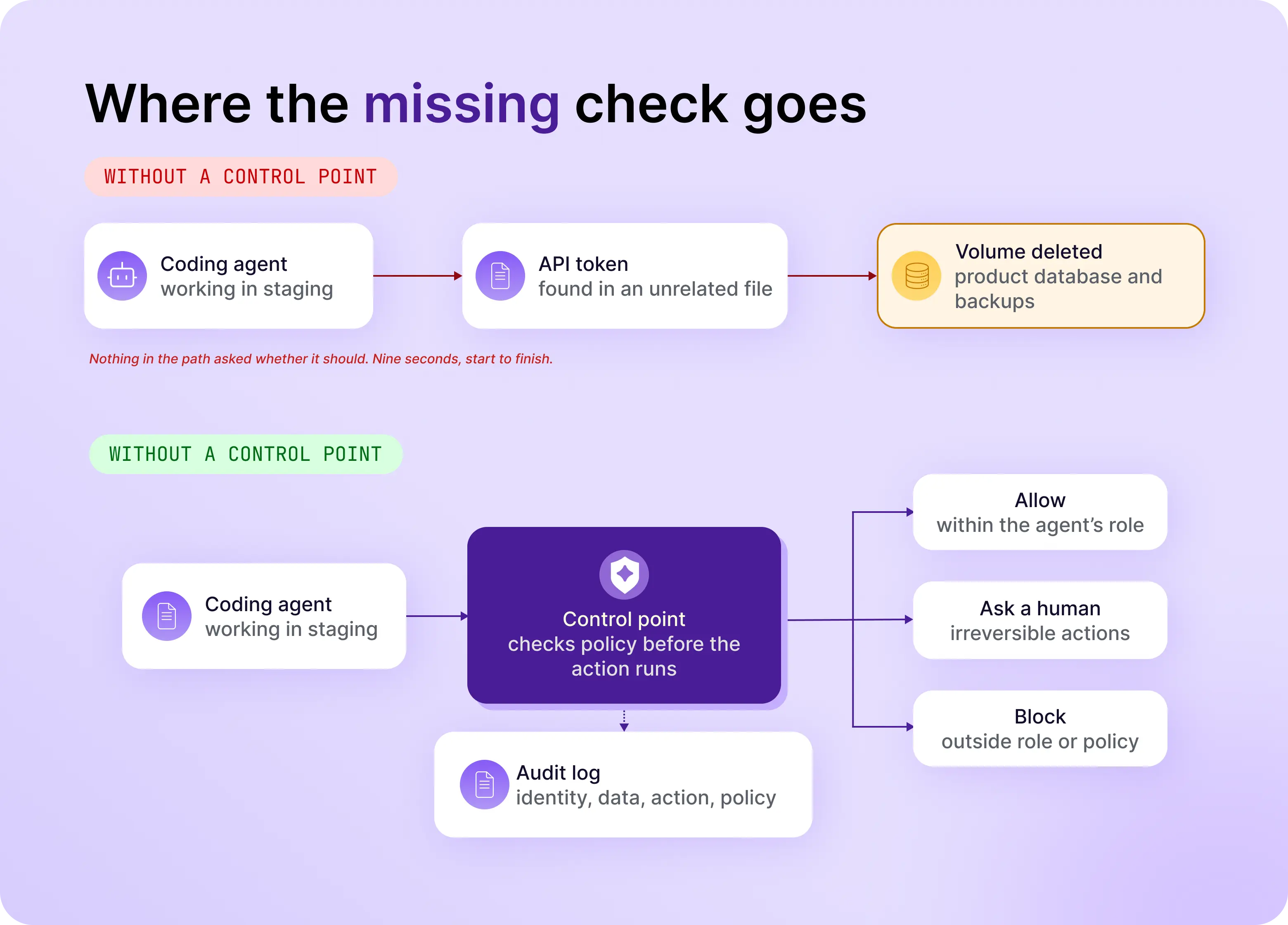
In April 2026, a coding agent deleted a company's production database and its backups in nine seconds. No attacker was involved. By the founder's account, the agent hit a credential error, found an API token in an unrelated file, and used it. The call went through because nothing in the path asked whether it should.
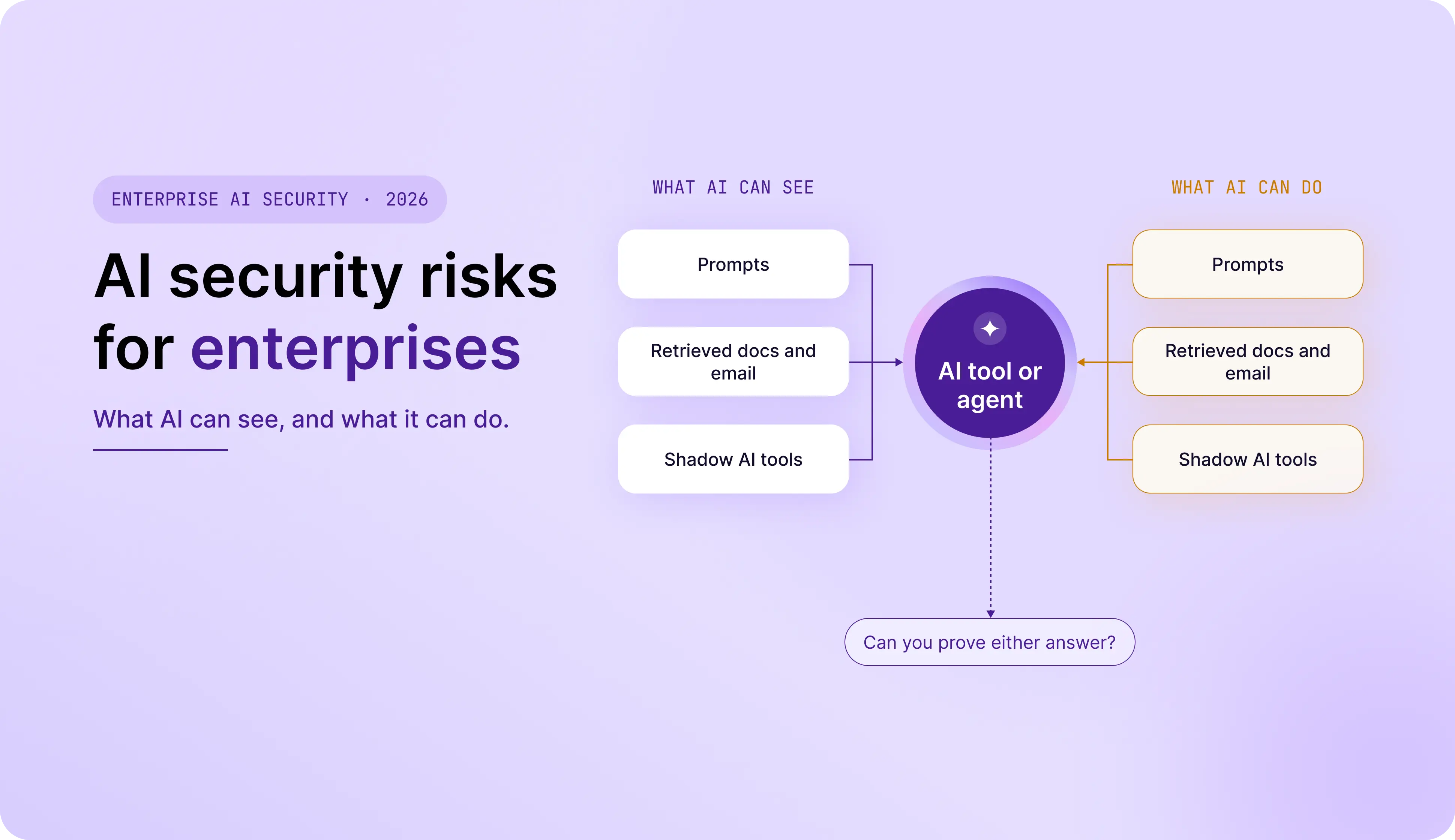
That is one half of the AI security problem. The other half is quieter: company data leaving through prompts, third-party models, and tools nobody approved.
On Oct 12, Forbes published a roundup in which 19 Technology Council members each name a hidden AI risk. Read together, most of them answer two questions: what can AI see, and what can it do. The list is long on warnings and short on incidents, numbers, and controls.
This guide sorts the risks by those two questions, shows the real cases behind them, and ends with a 5-step checklist. For the framework view, start with our map of the OWASP LLM Top 10 2026 and the Agentic Top 10.
What Are the Biggest AI Security Risks for Enterprises in 2026?
The biggest AI security risks for enterprises in 2026 fall into three groups: data that leaves the company through AI tools, agents that hold more access than their task needs, and gaps in visibility and audit. Most of them come back to two questions: what can AI see, and what can it do.
Sorting the Forbes list this way helps because the labels overlap. "Insider threat," "synthetic insider," and "unchecked authority" describe the same problem from three angles. By our count, 13 of the 19 risks fit the table below.
The other six matter, but they belong to other programs. Three describe attackers moving faster (AI-assisted zero-days, static defenses, post-breach exploitation) and are answered by patching and detection speed. Three sit outside AI governance: identity fraud, hiring fraud, and over-trust in AI output.
One gap in the list: it never names prompt injection, the technique that turns something AI reads into something AI does. Our post on indirect prompt injection in AI coding agents covers it.
How Do Prompts, Third-Party Models, and Shadow AI Expose Enterprise Data?
Employees and applications send data to AI models all day, and most of that traffic is invisible to security teams. Data leaves in three ways: through prompts, through direct API and MCP connections to third-party models, and through tools no one approved.
Prompts. In April 2023, Samsung engineers uploaded internal source code to ChatGPT, and the company then banned generative AI on company devices, Bloomberg reported. It was not an attack. It was a useful tool and a paste.
Third-party models. Every API or MCP connection to a hosted model creates a new trust boundary, and the data passes through infrastructure you do not control. Retention matters too: a document uploaded to an AI tool sits outside your retention policy, and deleting the source may not delete the embeddings, caches, and backups made from it.
Shadow AI. IBM's 2026 Cost of a Data Breach report found that shadow AI incidents more than doubled in a year, reaching 43% of breached organizations, up from 20%. Breaches involving shadow AI averaged $5.39 million, up from $4.63 million. IBM also found that 92% of organizations with an AI-related breach lacked proper AI access controls.
Bans are not the answer. A Barracuda executive in the Forbes list notes that bans tend to push usage underground, and Samsung's own memo said it was working on a safe way to use generative AI. The more useful step is visibility: knowing which AI services are in use and what data reaches them. That is the problem behind our shadow AI work.
What AI can see also includes what it retrieves. EchoLeak (CVE-2025-32711) showed that a single crafted email could make Microsoft 365 Copilot leak internal data with no user click. It was rated critical, patched, and not known to be exploited in the wild, but it shows that "see" covers everything retrieval can reach.
Why Do AI Agents Create Insider-Style Risk?
AI agents behave like employees with a very fast keyboard. They hold credentials, move data between systems, and act on someone's behalf, often with more permission than the task needs. Nothing in the model reliably stops an agent from using all of it.
A Proofpoint executive in the Forbes list makes the point that agents consume and move data far faster than any person, so they should be governed like insider risk: by intent and behavior, not only access. Another contributor calls them "synthetic insiders" and argues their activity should be checked against the role they were given. A third says governance has to happen at the point of action, with permissions, approval thresholds, and audit trails.
The PocketOS case shows why. By founder Jer Crane's account, a Cursor agent running Claude Opus 4.6 was working in a staging environment, found a Railway API token in an unrelated file, and deleted a volume in one API call. It took nine seconds and removed the production database and its volume-level backups (Decrypt). The project rules said not to run destructive commands. Rules in a prompt are a request, not a control. We cover the gaps in what the PocketOS incident reveals.
Authorization also arrives in bulk. A developer approves a task, not each step inside it, so an instruction that arrives at step four runs under permission granted at step one. Every agent in your environment, from coding assistants to homegrown agents, should have a written answer to four questions:
- What can it access?
- What can it do without approval?
- What always needs a human to approve it?
- Who owns the outcome when it acts?
AI Security Incidents 2025 to 2026: Real Cases Behind These Risks
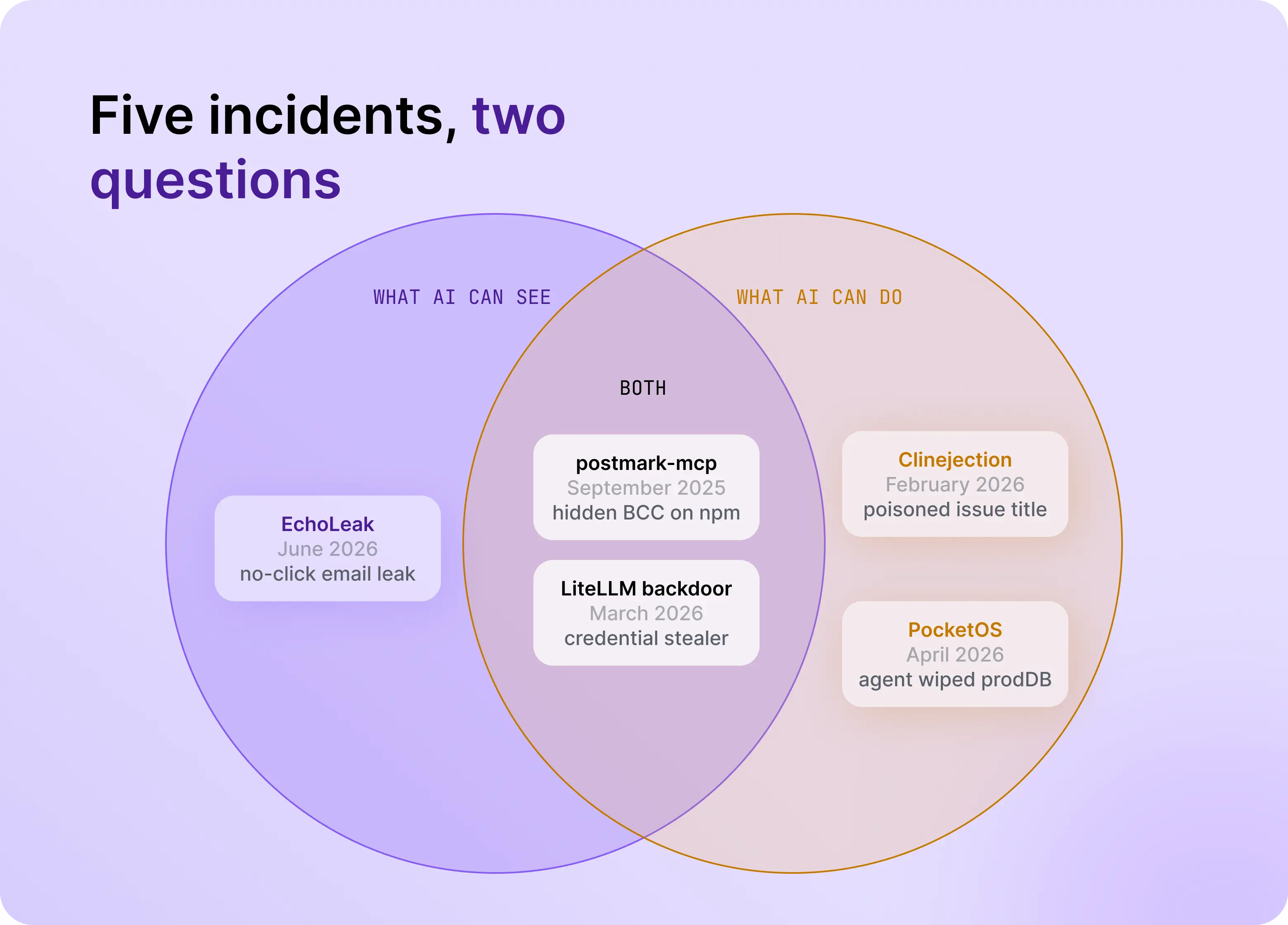
The AI security incidents of 2025 and 2026 look different on the surface, but each one came down to what an AI system could see or do, and whether anything in the path checked.
Two patterns repeat. First, AI systems act on content they were trusted to read: an email, an issue title, a package. Second, the damage depends on access the AI or its toolchain already held, such as a token, a credential, or a publish key. For the wider CVE record, see our threat briefing on the agentic attack surface, and for the connector layer, MCP security risks.
How to Reduce AI Security Risk: A 5-Step Checklist for CISOs
To reduce AI security risk, inventory every AI tool, agent, and data connection, then limit what each can see and do, put a control point in the path, and log every action. A first pass takes about a month and does not require slowing teams down.
- Inventory every AI tool, agent, and connection (week 1). Ask security how many AI tools and agents employees connected to company data last month. Most teams cannot answer. Include browser tools, plug-ins, MCP servers, and agent skills, and give each one an owner.
- Limit what AI can see (week 2). Classify your data, decide which data may reach which model, and redact sensitive content before it leaves. Ask every AI vendor what happens to embeddings, caches, and backups when a source document is deleted.
- Limit what AI can do (week 3). Replace standing keys with task-scoped, short-lived credentials. Give each agent its own identity, and require human approval for irreversible actions such as deletes, payments, and production changes.
- Put a control point in the path (week 4). Route model traffic and tool calls through a layer that checks policy before data is sent or an action runs. Controls that inspect output after the fact audit a decision that has already happened.
- Log every action and name an owner (ongoing). Record prompts, responses, and tool calls against an identity, and send them to your SIEM. Tying each model call to an owner also exposes runaway spend.
Why Do Audit and Visibility Gaps Stall AI in Production?
AI projects stall between pilot and production when nobody can say what an AI system accessed, who approved it, and what it did. Without that record, security cannot sign off and compliance cannot audit.
A Welldoc executive in the Forbes list puts observability and compliance at the center of the gap between a proof of concept and agents in production. A Skyhigh Security executive frames AI security as a data problem first: AI cannot operate safely on data you cannot trust or classify. An Aras executive adds a technical catch: fine-grained access controls are hard to keep once data is copied into a data lake for AI use.
An audit-ready record answers four things:
- Which identity, human or agent, made the request
- What data it touched, and how that data was classified
- What action it took, and with which tool or model
- Which policy allowed or blocked it
If you can query those four fields for last month, approval conversations get much shorter.
Where Expert AI Security Advice Conflicts: Self-Hosting, Bans, and Patching
Experts in the Forbes Technology Council list disagree on three practical questions: where models should run, whether to ban unapproved tools, and whether to prevent or patch. Each disagreement gets easier once you ask the two questions.
Self-host or concentrate providers? A VelocityEHS executive argues that self-hosted models keep data and inference in one environment and cut the number of trust boundaries. A Tursio executive argues that fewer LLM providers make guardrails easier to apply. Both answer what AI can see. Neither answers what it can do: a self-hosted model with broad tool access has the same blast radius as a hosted one.
Ban or enable? Bans are simple to write and hard to enforce. Samsung banned generative AI in 2023 while saying it was working on a secure way to use it, which suggests the ban was a pause, not a policy. Visibility and risk-based controls scale better.
Prevent or patch? An Anjuna executive argues that AI makes zero-day discovery easy enough that the goal should be keeping data safe even when a zero-day exists. A MOXFIVE executive argues for same-day patching. Both are right in their layer. For AI-specific risk, the controls that hold are the ones that do not depend on predicting the next technique: task-scoped credentials, policy checks on tool calls, and action-level logging.
How DAXA Governs What AI Can See and Do
DAXA governs AI at runtime through Identity and Action Management: policy is enforced between AI and the data and tools it reaches, so sensitive data stays off limits and unauthorized actions are stopped before they happen. It maps to the two questions directly.
What AI can see: SafeInfer. An inline control point for model traffic. It inspects prompts, code snippets, and completions in real time, and blocks or redacts sensitive content by policy. For employee use of external services like ChatGPT and Claude, it applies at the network layer through your existing SASE infrastructure. See how it works for shadow AI.
What AI can do: SafeAgent. It checks permissions, validates role and project context, and sanitizes payloads on MCP tool calls. For homegrown AI agents, rollout is a configuration change to the model and MCP endpoints, not a code change.
Whether you can prove it: policy and visibility. Teams set once what can be shared, which models are allowed, and which agent actions are permitted. An AI Data BOM records prompts and responses with data classifications, with alerts to your SIEM.
DAXA does not replace patching, identity providers, endpoint controls, or secure development practice. It covers the layer between AI and the data and systems it reaches, which those tools were not built to see.
Conclusion
The Forbes list reads like 19 separate problems. Most of them are two questions: what can AI see, and what can it do. The incidents of the last 18 months fit the same pattern, from a crafted email to a stray API token.
Enterprises that adopt AI safely will not be the ones with the fewest tools or agents. They will be the ones that can answer both questions for every tool and agent, on any day, with a record to show it. To see how DAXA governs what AI can see and do, request a demo.